Swift Playground

Swift Playground

By Apple

  • Category: Education
  • Release Date: 2020-02-11
  • Current Version: 4.7
  • Adult Rating: 4+
  • File Size: 580.94 MB
  • Developer: Apple
  • Compatibility: Requires iOS 15.0 or later.

Description

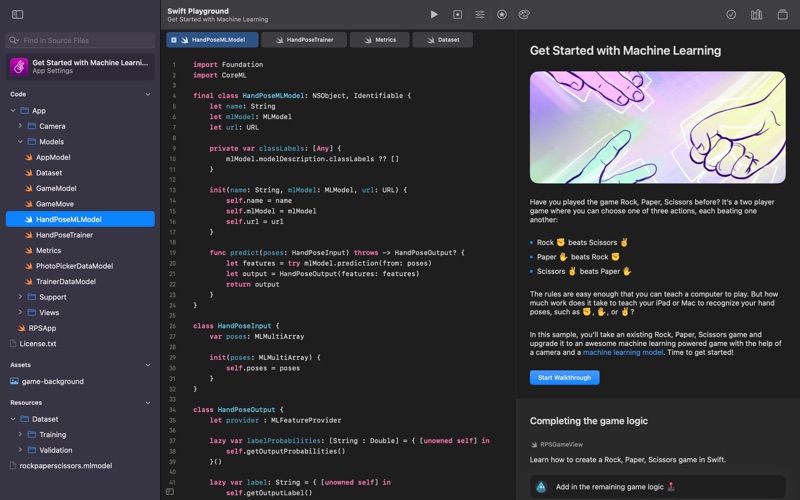
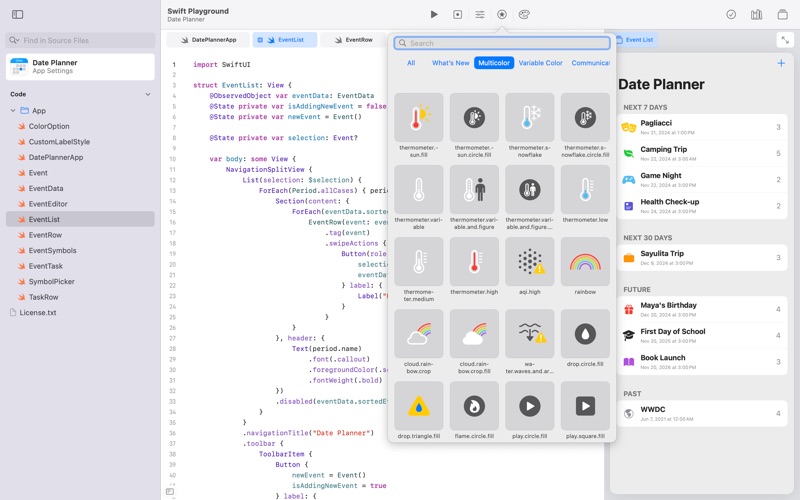
Swift Playground makes it fun to learn to code and build real apps. You solve interactive puzzles in the guided “Get Started with Code” and learn the basics of building apps in “Get Started with Apps.” You experiment with a wide range of challenges and samples that let you explore unique coding experiences. Swift Playground doesn’t require any coding experience — it’s perfect for anyone just starting out, from eight to one-hundred-and-eight. The whole time you are learning Swift and SwiftUI, the powerful programming technologies created by Apple and used by professionals around the globe to build many of today’s most popular apps. And because it’s built to take advantage of real frameworks, Swift Playground provides a one of a kind learning experience. Lessons Built-in • Apple-created lessons guide you through the core concepts of programming by using code to solve puzzles • See your code run in a beautiful, interactive 3D world that you can rotate and pinch to zoom using the trackpad • Animations introduce each new coding concept at a high-level before you dive into the puzzles • Glossary and built-in help pages give detailed information about available commands, frameworks, and terminology Explore and Create • Interactive coding shows the results of your code instantly, alongside your work • Step through code in playground books to highlight each line as it runs • Books provide a head start to create your own playgrounds that use graphics and sound • App Gallery walks you through the building blocks of apps, like tabbed navigation and downloading data Build Apps • Create real apps using SwiftUI • See your code changes reflected live while you type • Type quickly and accurately with inline code suggestions • Extend your app with an ecosystem of Swift packages • Navigate your code with project-wide search Smart Coding Assistance • Click and drag a brace to wrap a block of code inside a loop or conditional statement Drag and drop snippets of commonly-used code directly into your playground • Fix common code errors with helpful inline suggestions • Stay organized with automatic code formatting Real Swift and SwiftUI Code • Learn the same powerful Swift programming language used by the pros to create apps in the App Store Build dynamic, elegant apps using SwiftUI, a modern way to create user interfaces Access powerful frameworks such as SpriteKit for 2D games • Use Bluetooth APIs to write programs that communicate with real-world devices Share or Publish Send your projects to friends and family using Messages, Mail, AirDrop, or other Share Sheet extensions • Bring your app projects to Xcode on Mac and back again • Submit your completed apps to the App Store with App Store Connect

Screenshots

Reviews

  • Come on, Apple. I need this!

    1
    By Degan J.
    How is this so broken? Latest OS makes it unusable as it doesn’t inherit the permissions necessary for it to even function. Keeps popping up persistently with no end.
  • Doesn’t Run on MacBook Air M4

    3
    By Adiv
    I had used the Swift Playground app in the past, on my old MacBook Air M1. Recently, I purchased a MacBook Air M4. I downloaded the application but it displays no UI. The right click menu for its Dock icon indicates that there were several windows belonging to the app, but I couldn’t see any of them. Very strange behavior!
  • App permission dialogue keeps popping up

    1
    By PolarBearOnIce
    “Get Started with Apps wants to access data from other apps” dialogue keeps popping up every few seconds. Clicking allow does not suppress the dialogue and it keeps popping up forever. It might be related to the new privacy model with the macOS 26. Unusable.
  • Has persistent popup that asks for permissions

    1
    By CharlesDickens98
    This Swift playgrounds software worked fine until the moment that I upgraded to Mac OS Tahoe. I get a popup that asks for permissions from the user to access data from other apps. I hit allow each and every time to get the program running without interruption.
  • Buggy

    1
    By jumagato
    Getting any of the courses makes the app quit unexpectedly (Macbook Pro M3).
  • doesnt work, outdated

    1
    By Ticky89
    opens in a tiny window with no indication of what to do next. picking a lesson prompts to “get” it (like downloading an app). it downloads then does nothing.
  • Not working

    1
    By vv-work
    Every time I am trying to open any of the tutorials after downloading nothing happens.
  • Fun but extremely buggy

    3
    By JoshJohnston
    This app is great for what it does - introduces people to programing concepts and Swift and helps them get up to speed. Unfortunately this app does not have the same quality as typical Apple products. The UI is buggy, when you download a lesson (? I don’t know are these lessons?) it finishes and then the download progress turns back into a Get button. It isn’t obvious how to start the lessons once you download them. You can have multiple copies of the same lesson (see bug above) labeled copy or copy 1, etc.
  • Playground Modules not downloading

    3
    By JW Mac
    I”ve attempted to download modules on both my Mac mini m2 and mini m4 pro. Not working. Update: I’ve found that the modules do download. But it’s straight to Swift Playground. One has to open that and see the modules. The problem seems to be the App Store UI showing “Get” after downloading. I’ve upgraded to 3 stars. I’m still neutral on this version.
  • I can’t open any of the modules

    1
    By Leaf Shiver
    Every time I select “get” it downloads, but when the ring finishes it goes back to “get” and never launches the mod


keyboard_arrow_up