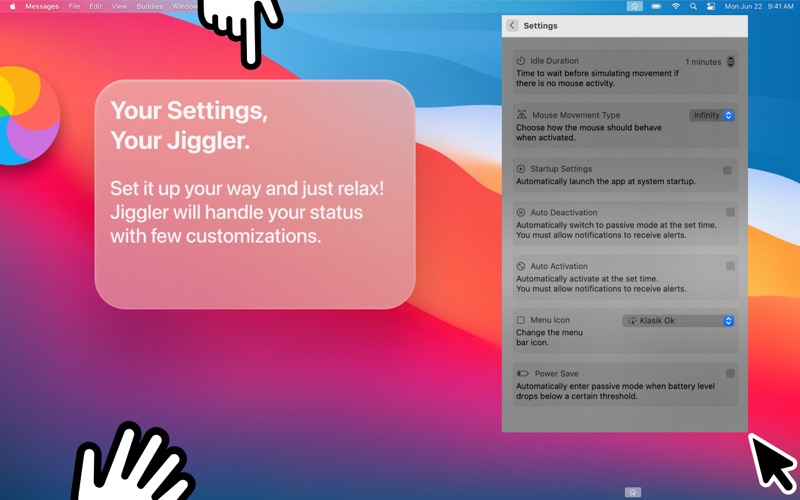
Jiggler provides automatic cursor control designed for users with accessibility needs. Whether you experience motor impairments, tremor conditions, or need cursor assistance for extended tasks, Jiggler offers reliable, configurable cursor support directly from your menu bar. ACCESSIBILITY FEATURES - Automatic Cursor Assistance - Provides cursor movement when no user input is detected, helping users who need continuous cursor activity - Two Assist Modes: - Continuous Mode: Smooth, visible cursor movement pattern for users who need active cursor feedback - Minimal Mode: Single-pixel cursor adjustment for users who need subtle, non-disruptive assistance - Customizable Activation Delay - Set the time before cursor assistance begins (1 minute to 2 hours), adapting to your individual needs - Smart Scheduling - Automatically enable and pause assistance at specific times to match your daily routine - Video-Aware - Automatically pauses during video playback so media is never interrupted - Battery Conscious - Auto-pauses when battery drops below your set threshold to preserve power - Multi-Display Support - Works across all connected displays - Menu Bar App - Runs quietly in your menu bar with no dock icon, staying out of your way WHO IS JIGGLER FOR - Users with motor impairments who need automatic cursor assistance - Users with tremor conditions who benefit from cursor stabilization - Users with visual or cognitive accessibility needs requiring an active display - Professionals running presentations, monitoring dashboards, or processing data who need an active screen - Users performing long-running renders, uploads, or downloads without interruption DESIGNED FOR ACCESSIBILITY Jiggler is built with inclusive design principles. The two assist modes address different accessibility needs: Continuous mode provides visible cursor feedback for users who need to track cursor activity, while Minimal mode offers the subtlest possible assistance without visual disruption. Smart scheduling integrates with your daily routine, automatically activating during hours when assistance is needed and pausing when it is not. Battery management ensures the tool never unexpectedly stops when you need it most. SMART AUTOMATION Set your schedule once and Jiggler automatically manages cursor assistance throughout your day. On battery? Jiggler pauses at your configured threshold to preserve power. PRIVACY FIRST Jiggler runs 100% locally on your Mac. No data collection, no accounts required, no tracking. Your activity remains completely private. PRICING - Free: Basic cursor assistance with Continuous mode - Premium: Unlock all features including Minimal mode, custom activation delays, smart scheduling, and battery management Download Jiggler and experience accessible, automatic cursor control.