Hours Tracker: Work Scheduling

Hours Tracker: Work Scheduling

By Toto Ventures Inc.

  • Category: Business
  • Release Date: 2019-06-11
  • Current Version: 1.2
  • Adult Rating: 4+
  • File Size: 38.98 MB
  • Developer: Toto Ventures Inc.
  • Compatibility: Requires iOS 12.0 or later.
Score: 4
4
From 77 Ratings

Description

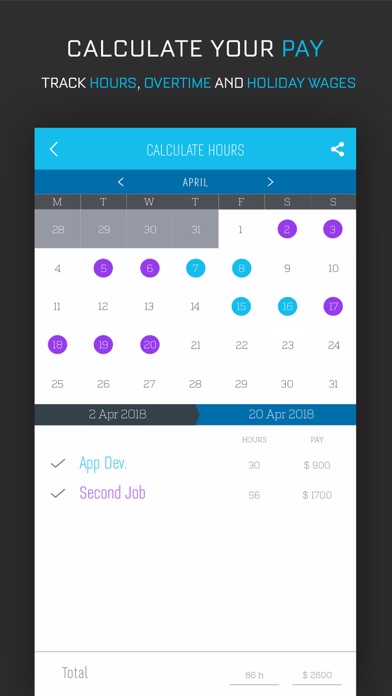
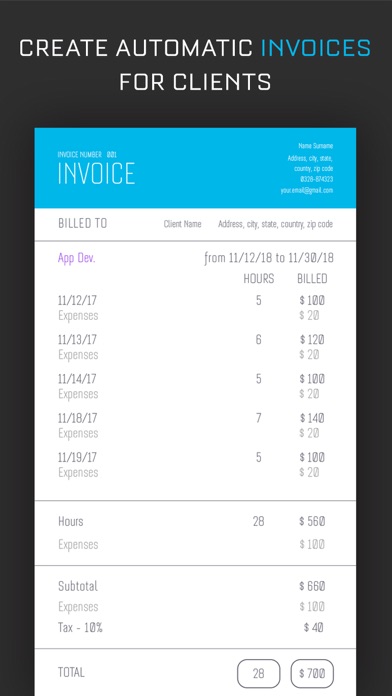
Hours Tracker is your clock in and clock out time manager. Track shifts, jobs and hours with ease. Never forget to clock in again. Location based clock in/clock out management. Set reminders or have the app automatically clock you in and out. Automatic time rounding: up, down or to nearest. Calculate your pay, track hours and create invoices with Hours Tracker Plus. Track overtime and holiday wages. Download Hours Tracker today! Subscription pricing and terms: Hours Tracker offers three auto-renewing subscription options: $3.99 per week $7.99 per month $19.99 per year These prices are for United States customers. Pricing in other countries may vary and actual charges may be converted to your local currency depending on the country of residence. Your Hours Tracker subscription will automatically renew at the end of each term and your credit card will be charged through your iTunes account. You can turn off auto-renew at any time from your iTunes account settings but refunds will not be provided for any unused portion of the term. Read more about our terms and conditions here: Terms of Use: http://totoventures.com/terms-of-use/ Privacy Policy: http://totoventures.com/privacy-policy/

Screenshots

Reviews

  • Insightful

    5
    By Amandakayayy
    Pinpoint the location of your job by inputting address or business name, enter your hourly wage Options of : choosing to have app remind you to clock in anytime your real time live location is detected near the address entered, or Choose to have app auto “clock” you in and track your hours based off your real time live location at address. Same goes for clocking out which makes app stops tracking your hours, you can set it to automatically stop tracking hours once it’s detected you’ve left that location or set it to remind you to clock out manually in app so it stops tracking hours For me personally the auto clock in and out is a great feature bc it’s more accurate than it would be had I have to remember to do so manually bc I tend to forget All that for free with zero annoying adds popping up constantly and app is easy to use with clean and simple layout Addition options to add any OT wage, the amount of the OT wage, and when OT wage kicks in ( like for example is it after certain # of hours are worked in a day or in a week) option to have your hours tracked at no set location (for anyone with a “mobile” job or remote work locations that changes daily) and instead do so based off specific times /days or routines that app starts to recognize based off previous days You can add multiple jobs (but then you would have to pay in order to add more than one) You can color code specific jobs from others so when overviewing month of what you’ve worked it’s easy to differentiate one job from the next I got the app specifically to give me insight of my hours worked so I could know what to expect to be paid before paycheck comes which helped me budget ahead of time and it’s worked great and I would highly recommend for anyone wishing to have hours tracked on a simple, to the point app with a quick, no hassle setup
  • SUGGESTION!!!

    4
    By Lizzie_10
    I love this app, I usually input my shifts into my own calendar app on my phone. But I love that this one you can leave notes under the days! I just wish there was a feature to increase the text size! I’m 21 — and even for me it’s too small!!!
  • very helpful

    4
    By kensybelle
    i’ve tried other apps like this this one is my favorite so far!
  • love it

    5
    By averybailly
    this is a great app to use for multiple jobs so i can see all of my schedules in one place
  • Simple.

    4
    By r_d0217
    Simple.
  • Great app

    3
    By scochran15
    This is a great app to use as individuals but I have purchased the plus plan and it still won’t give me the correct access even though it has been paid
  • Upset

    1
    By lost712
    I have been using the app for the last 2 years and worked great for me. Till today I went to put in some information and all the information I had the last 2 years was gone!
  • I love it!

    5
    By Dejj79
    VERY HELPFUL!!
  • Very handy

    5
    By thatgoatdeus
    get this app. it clocks in and out automatically.
  • App

    4
    By talchich
    It does what I need it to do

keyboard_arrow_up